
Buttons & Connectors
Front view
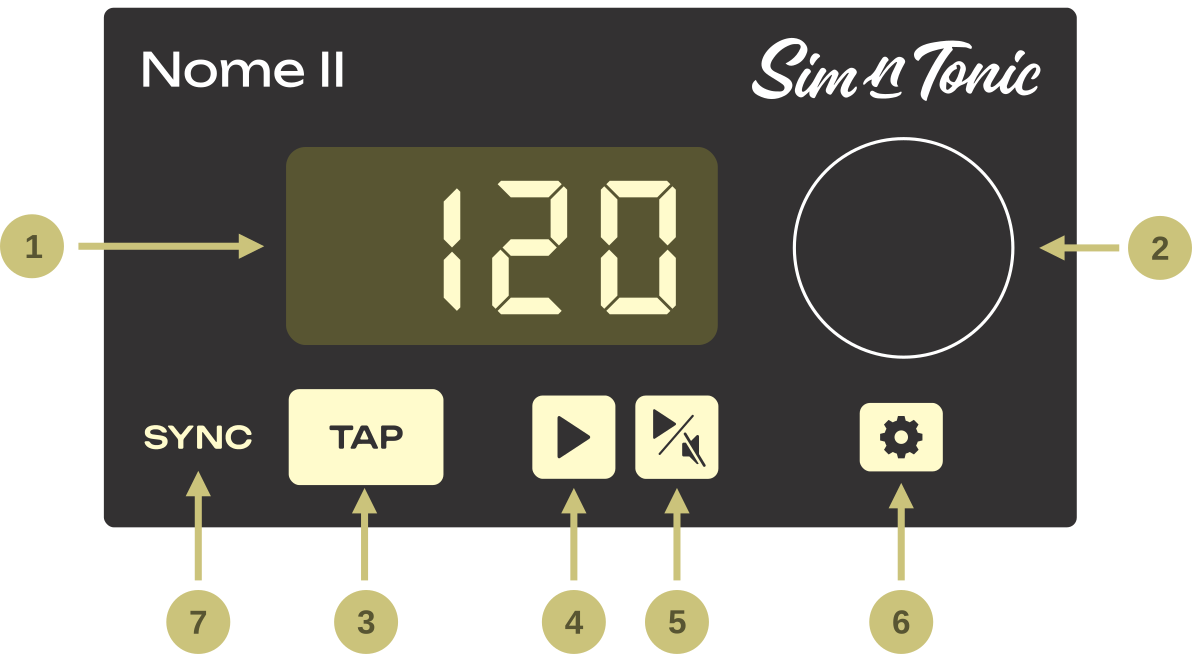
Display - shows the current tempo (or current setting/value/info)
Knob
turn it to change the tempo, or change settings/value
press it to validate or change the tempo decimals
Tap Tempo Button - blinks at tempo (purple on downbeat, yellow on other beats)
Play Button 1
start/stop your gear on MIDI Out 1
hold down to resync/restart your gear
Play Button 2
Same as above, but for MIDI Out 2
Can be configured to mute the metronome (see the ”PL.2” setting)
Setup Button - enter and leave the settings, hold down to turn off the device
SYNC LED:
Yellow
 when the device is synced to
U-SYNC
when the device is synced to
U-SYNCPurple
 when the device is synced to an external audio
signal
when the device is synced to an external audio
signalBlinks momentarily green
 or red
  at every tap when tapping
the tempo
at every tap when tapping
the tempo
Combo actions:
Hold
 + rotate
  to change the metronome’s volume
Hold
+ press  or
or  to nudge the
time backward or
forward
to nudge the
time backward or
forwardHold
 + rotate to apply previous or next
Preset
+ rotate to apply previous or next
PresetHold
while tapping to tap quicker tempo
changes (no averaging)Hold
+ hold  for 1 sec to “lock” the tempo
Back view
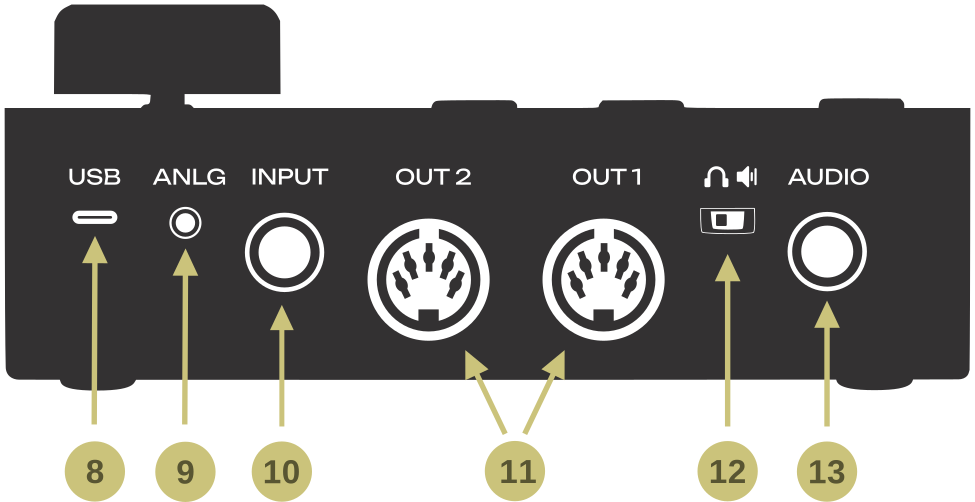
USB Type-C plug
Powers the device
USB communication with a computer
CV/Analog/DIN Sync Clock Output
- 3.5mm TRS plug(stereo jack)
sends 5V analog pulses on both Tip & Ring for your modular synths
can be configured to DIN Sync (sync24) for vintage gear
this will require a TRS-to-DIN Sync adapter
Multi-function Input
6.35mm TRS plug (stereo jack)
plug in 2 pedals here (one on Tip/Left and one on Ring/Right)
plug a drum pad here (to tap the tempo and/or time signature)
send an external sync signal here (see external sync section)
MIDI Outputs
Sends MIDI Clock, MIDI Start/stop, and forwarded USB-MIDI messages
Start/stop can be independently controlled on each port
Headphones/Line Out switch
selects headphones (
) or balanced line out (
) for audio out (6)
Audio Output
6.35mm TRS plug (stereo jack)
plays metronome click
Do not send phantom power (+48V) to this output